Sudoku - Classic Sudoku Puzzle
- 4.7
- Rating
- 100.00M
- Installs
- Free
- Price
 Analysis by App-foxy
I like Sudoku because it gives me something useful to do in short, quiet moments without demanding a story, a large download, or a complicated tutorial. Sudoku - Classic Sudoku Puzzle takes that familiar number-grid format and turns it into a practical puzzle game for Android. It is free to install, suitable for Everyone, and made by Oakever Games. After spending time with it, I see the appeal clearly: the rules are instantly recognizable, the offline format makes it convenient, and the basic loop is easy to fit around an ordinary day.
That simplicity is also the main point to understand before installing it. This is not a puzzle adventure with a narrative, characters, or a large collection of unrelated mechanics. It is a focused Sudoku experience. You place numbers, test your logic, correct mistakes, and gradually become more comfortable with harder grids. The enjoyment comes from solving well, not from collecting a world or following a plot.
How the first few sessions establish a goal
The early goal is refreshingly direct: complete a Sudoku grid without guessing your way through it. Each row, column, and box has to contain the required numbers without duplicates, so the first minutes are spent learning to look for obvious placements. I usually begin with a number that already appears frequently across the grid, then scan the related rows, columns, and boxes to see where it can legally fit.
You May Also Like

 Blood Strike: 2.5 Anniversary
Blood Strike’s Loadouts Turn Every Drop Into a Tactical Gamble
A close look at Blood Strike’s custom loadouts: how fast access to signature weapons reshapes its battle royale rhythm, rewards preparation, and narrows the gap between fights.

 Pandora - Music & Podcasts
Pandora’s Music Is Easy to Start, but Harder to Recover
Pandora’s strength is its low-effort path from a seed to a station. Its weak spot is how much confidence it asks you to place in connection, setup, and quiet recovery.

 8 Ball Pool
8 Ball Pool Is Built on Rivalries, Rematches, and Routine
A close look at the rivalries, rematches, shared routines, and unanswered safety questions that turn a quick pool match into a persistent mobile community.

 Samsung Music
Samsung Music’s Quiet Strength Is Playing What You Already Own
Its reach comes less from spectacle than from dependable access to a personal library. That simplicity is both the app’s strongest retention engine and its ceiling.

 AccuWeather: Weather Radar
AccuWeather Review: A Quick, Clear Forecast for Everyday Decisions
For everyday plans, the best forecast is the one you can understand quickly. AccuWeather makes rain timing, radar, and local conditions easy to act on, with a few trade-offs.

 Hill Climb Racing
Why Hill Climb Racing Still Turns Crashes Into One More Run
A tiny car, a bumpy hill and one more upgrade: Hill Climb Racing keeps resurfacing because its simple chaos makes every near-miss feel personal.
More From Our News Desk
View All News


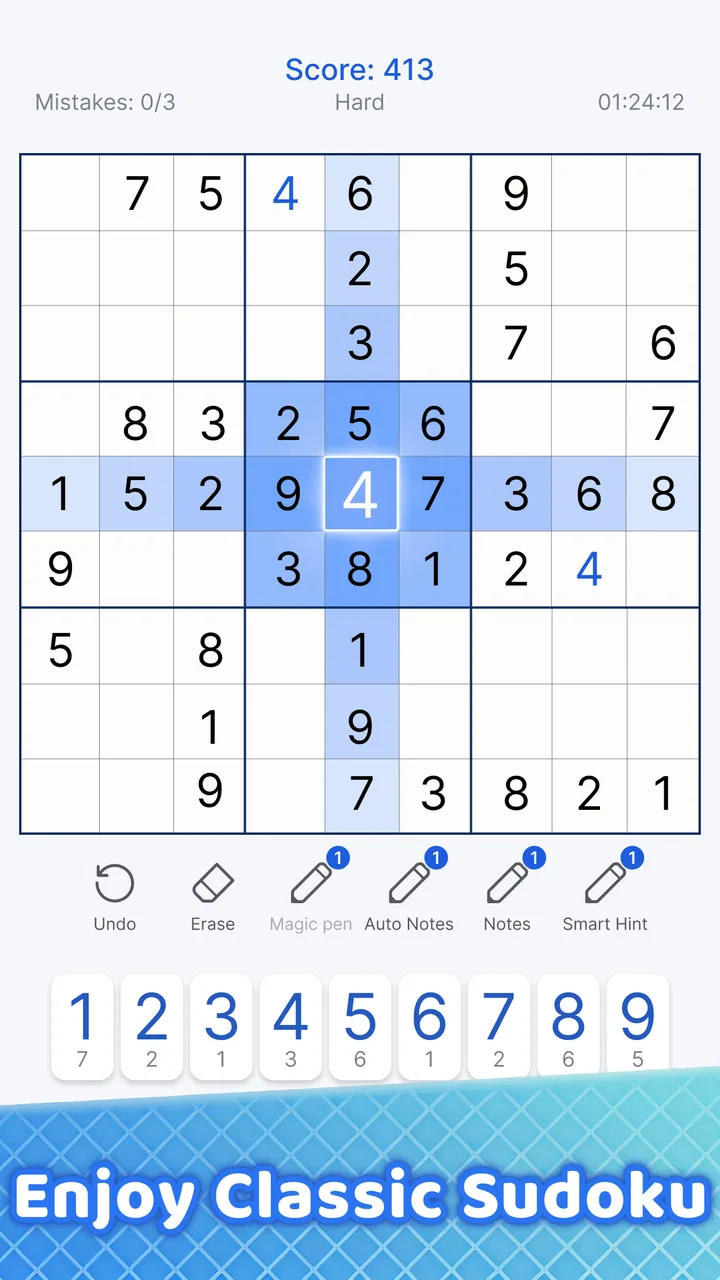
That approach makes the game approachable even if you have not played Sudoku recently. I do not need to learn a complicated control system. Tapping a cell and choosing a number is enough to get started, while the real learning happens in my head as I recognize patterns. The interface stays out of the way, which matters in a logic game where visual clutter can make a simple puzzle feel harder than it is.
For a new player, the first useful milestone is not speed. It is finishing a grid while understanding why each number belongs where it was placed. I recommend resisting the temptation to fill a cell merely because one option looks likely. Sudoku becomes much more satisfying when every move follows from the information already on the board.
There is also a practical goal for returning players: use a short session to sharpen concentration. I often approach one puzzle during a break, before bed, or while waiting somewhere. Because the game can be played offline, it suits situations where I do not want to depend on a connection. That does not make every session relaxing, though. A difficult grid can hold my attention longer than planned, especially when I am close to a solution and do not want to stop.
What progress feels like when there is no story
Sudoku does not need a traditional progression system to show improvement. My progress signals come from the way I solve. At first, I rely heavily on obvious singles: a cell with only one possible number, or a number that has only one available position in a box. Later, I start tracking candidates more carefully and spotting relationships between cells.
This kind of progress is personal rather than theatrical. The game does not need to tell me that I have become better; I notice it when I stop scanning randomly and begin working methodically. I also make fewer careless entries because I have learned to pause before committing to a number. For me, that is more meaningful than an artificial reward for simply opening the app every day.
One useful habit is to treat candidate notes as a thinking tool rather than a rescue button. When several numbers could fit in a cell, I write down the possibilities and compare them with nearby cells. This reduces guesswork and makes the logic visible. The trade-off is that note-taking slows the first part of a puzzle, but it usually saves time later by preventing me from rebuilding the whole grid after one weak assumption.
Another strong workflow is to separate scanning from deduction. I first inspect rows, columns, and boxes for straightforward placements. Only after those options are exhausted do I look for more involved relationships. This keeps the early game moving and prevents me from overcomplicating a grid that still contains easy moves.
For someone who wants visible unlocks, this may feel restrained. The satisfaction is mainly in solving more cleanly and handling greater complexity, not in opening a new character, board theme, or story chapter. That is an important difference from many mobile puzzle games. Here, the puzzle itself is the reward.
Difficulty and the rhythm of a complete grid
The difficulty curve works best when I treat each puzzle as a separate mental workout. Easier boards let me settle into the rules and build confidence. Harder boards demand more patience because the obvious placements disappear, leaving me to compare candidates and search for patterns across several areas of the grid.
A good Sudoku session has a particular rhythm. The opening usually feels active because several numbers can be placed quickly. The middle becomes slower as the simple opportunities run out. Near the end, one correct deduction can unlock several others. That release is the reason I keep returning: a board that seemed stuck can suddenly become readable after one careful observation.
The downside is that the pacing can become uneven. If I miss a small deduction, I may spend several minutes staring at the same section and feel as though the game has stopped moving. This is not necessarily a flaw in the puzzle, but it can be frustrating on a phone, where a tiny visual oversight is easy to make. When that happens, I find it better to review the last few placements than to keep tapping at random.
I also advise new players not to judge their ability by completion time. Speed encourages careless guesses, and a wrong guess can create a chain of apparently logical but invalid moves. A slower, clean solve teaches more. Once the scanning process becomes familiar, speed tends to improve naturally without turning the game into a race.
The compact format makes the game suitable for different kinds of players. A beginner can use it as a gentle introduction to logic puzzles, while an experienced Sudoku fan can use it for regular practice. The limitation is that players who need a strong external challenge structure may want more than this straightforward format provides. If your motivation depends on tournaments, narrative rewards, or a large collection of puzzle genres, a broader puzzle app may keep you engaged longer.
Where the challenge supports retention
The main reason to come back is the reliable promise of one more solve. Sudoku has a naturally repeatable loop: open a grid, inspect the layout, form a plan, work through the deductions, and finish or pause when concentration runs out. The offline design strengthens that loop because I can play in places where I would not normally use an online game.
That convenience is especially useful in an everyday situation such as a commute with unreliable reception. I can start a puzzle, solve a few sections, and put the phone away without needing a connection at every step. It also works during a lunch break when I want an activity that is more mentally engaging than scrolling but less demanding than a full game session.
Still, the same repeatability can feel like repetition if I am looking for constant novelty. The board changes, but the fundamental action remains placing numbers according to fixed rules. I appreciate that consistency, yet I would not recommend it to someone who quickly tires of familiar mechanics. The game is strongest for players who enjoy refining a skill rather than chasing surprise.
There is another form of retention pressure that I notice in myself: unfinished puzzles occupy my attention. When I leave a grid with only a few empty cells, I feel a strong pull to return and complete it. That can be motivating, but it can also make a short break less short. I have learned to stop after a natural checkpoint instead of beginning a new puzzle when I know I have limited time.
In-app purchases range from $0.99 to $19.99 per item, so the free entry point is not the entire commercial context. I would approach purchases carefully and decide whether they add value to my own routine before spending. The core appeal for me is the solving itself, so I would not treat optional spending as necessary to understand why the game works.
How it compares with paper, browser puzzles, and larger apps
Compared with a newspaper or printed Sudoku book, this version is more convenient because I always have it on my phone and do not need a pencil or eraser. The screen also makes correcting an entry cleaner. Paper still has an advantage for players who enjoy writing candidates freely across a large page, and some people simply find a physical puzzle less distracting than a phone.
Compared with browser-based Sudoku, the offline capability is the clearest practical advantage. I do not have to open a page or wait for a connection before starting. A browser may be preferable if I want to switch among many puzzle sites or use a larger display, but that flexibility comes with a less focused experience.
Compared with broad puzzle collections, this game is more specialized. A collection can provide variety when I want to move from Sudoku to word, tile, or matching challenges. Oakever Games’ title is a better fit when I specifically want the familiar Sudoku structure and do not want unrelated modes competing for my attention.
The large audience reflects how accessible the format is: it has passed 100 million installs, holds a 4.8 average from about 2.9 million ratings, and has around 46 thousand written reviews. Those figures do not replace personal preference, but they do show that this is an established choice rather than an obscure experiment. I would still judge it by whether its focused design matches the kind of challenge I want.
Small techniques that make the experience better
My first practical tip is to scan a whole box before jumping between individual cells. Boxes often reveal a missing number faster than a row-by-row search, especially when the grid is still mostly open. Once I find a number that can occupy only one position inside that box, I place it and rescan the affected row and column immediately.
My second tip is to use a pause as part of the solving process. When I feel tempted to guess, I put the phone down for a moment and return with a fresh scan. Sudoku rewards a clear view more than frantic tapping. A short reset often exposes a candidate I overlooked.
My third tip is to review the source of a contradiction rather than erase everything. If a row contains a duplicate or a cell has no legal candidate, I trace backward to the last assumption that was not fully supported. This is a better learning method than restarting instantly, because it shows exactly where my reasoning became unreliable.
For experienced players, the most useful adjustment is to distinguish a difficult puzzle from a poorly managed solve. If the grid seems impossible, I check whether I have updated candidate notes after every placement. Stale notes can make a solvable board look blocked. This habit is particularly valuable on a small phone screen, where it is easy to forget that one new number has changed several neighboring cells.
Who should install it and who should skip it
I recommend this game to anyone who wants a free, familiar logic puzzle that can be played offline and in short sessions. It is a good choice for beginners because the rules are easy to understand, and it remains useful for experienced players who enjoy practicing observation and deduction. The Everyone rating also makes it suitable for a broad household audience.
I would be more cautious if you need a strong sense of narrative progress or a constant stream of new mechanics. The game’s goals, unlocks, and pacing are centered on solving grids, so players who expect elaborate progression may find it too narrow. I would also skip it if I knew I was looking for a social competition, because the appeal here is quiet concentration rather than interaction with other players.
Device compatibility is reasonably broad, with support beginning at Android 7.0. The current version is 5.49.1, which indicates that the app is maintained as an ongoing product rather than a one-off release. It first appeared on July 27, 2018, so its long presence also helps explain why the format feels settled and familiar.
My verdict on the long-term progression
After looking at the full loop, I think the progression succeeds because it is skill-based. Early goals teach me to recognize legal placements, progress signals appear in cleaner reasoning, and the difficulty curve gives each completed grid a sense of achievement. The retention comes from the satisfying gap between “I understand the rules” and “I can solve this board without guessing.”
That design is not flashy, but it is honest. The game does not need to pretend that Sudoku is something else. Its strongest feature is the dependable structure: I can open it when I have a few minutes, play offline, and leave with the feeling that I exercised my attention rather than merely passed time.
My final recommendation is positive, with one clear condition: install it if you want Sudoku itself. If you want a puzzle platform packed with stories, social systems, or constantly changing objectives, choose a broader alternative. For focused number-grid solving, however, this is an easy title to keep available on my phone. It is at its best when the puzzle is the progression, the deduction is the reward, and a quiet completed grid is enough to make the session worthwhile.
FAQs for Sudoku - Classic Sudoku Puzzle
01What features does the Sudoku - Classic Sudoku Puzzle app offer?
The Sudoku - Classic Sudoku Puzzle app provides a variety of features to enhance your gaming experience. It includes multiple difficulty levels, from beginner to expert, daily challenges, and a hint system for when you get stuck. The app also offers an intuitive interface and a timer to track your progress.
02Is the Sudoku - Classic Sudoku Puzzle app free to use?
Yes, the Sudoku - Classic Sudoku Puzzle app is free to download and play. However, it may contain in-app purchases and ads. These purchases can enhance gameplay by removing ads or providing additional features such as more hints or advanced puzzles.
03Does the app require an internet connection to play?
No, the Sudoku - Classic Sudoku Puzzle app can be played offline. You can enjoy solving puzzles without needing an internet connection, making it a great option for travel or when you're in areas with limited connectivity.
04How does the app ensure a variety of puzzles?
The app generates puzzles randomly, ensuring a fresh experience each time you play. With thousands of unique puzzles available, players can enjoy a diverse range of challenges. Regular updates may also introduce new puzzles and features to keep the game engaging.
05Is Sudoku - Classic Sudoku Puzzle suitable for beginners?
Absolutely! The app is designed to cater to all skill levels. Beginners can start with the easy level, where they can learn the rules and develop strategies. The app’s hint system and tutorials are also helpful for new players looking to improve their skills.
Pros
- Intuitive interface for easy navigation.
- Multiple difficulty levels for all players.
- Auto-save feature prevents data loss.
- Minimal ads for uninterrupted gameplay.
- Hints available for tricky puzzles.
Cons
- No offline mode for some features.
- Limited customization options.
- Occasional lag on older devices.
- In-app purchases can be pricey.
- No social sharing for achievements.

Sudoku - Classic Sudoku Puzzle
Gallery